Collapsed Nodes (Mutations Only)
Deterministic DAG pruning that collapses hundreds of unchanged resources into synthetic bridging edges.
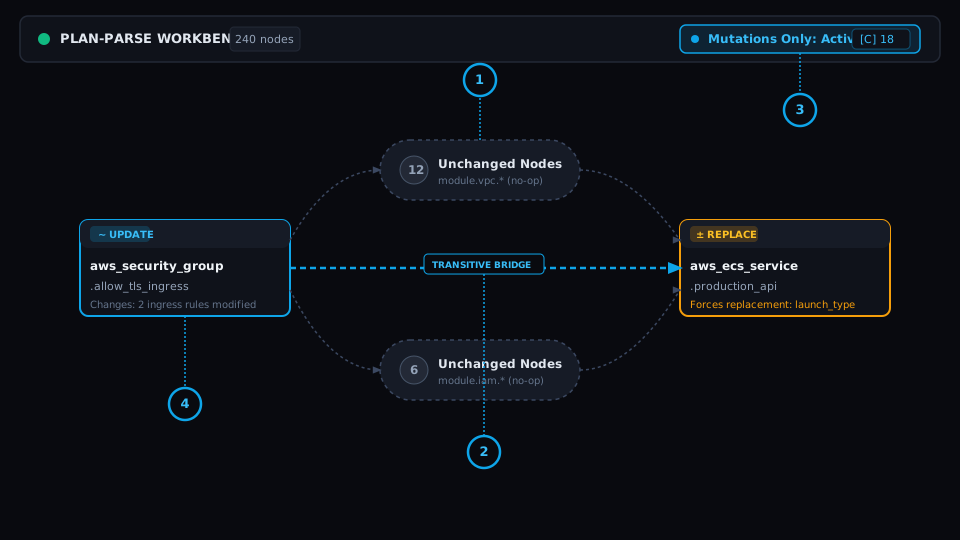
Collapsed Cluster Pill
Condenses intermediate unchanged clusters into a single pill indicating the exact count of hidden no-op resources.
Synthetic Transitive Bridging Edge
Computes transitive closure edges so upstream dependency lines between surviving mutating nodes remain mathematically intact.
Header Toggle & Live Counter
Dedicated workbench toolbar button showing live collapsed counts with hotkey accelerator indicator [C].
Mutating Node Focus
Keeps only resources with active mutations (create, update, delete, replace) prominently expanded and rendered.
The Problem
The Signal-to-Noise Paradox
Real-world enterprise Terraform configurations frequently govern 300+ resources across multiple modules. When a pull request modifies just 3 resources, reviewing the complete unreduced plan requires panning across a massive sea of unchanged nodes. Engineers miss critical changes simply due to cognitive exhaustion.
Under the Hood: Engine & Algorithm
Transitive Closure DAG Reduction
plan-parse runs a deterministic graph contraction algorithm directly on the client canvas. It isolates all nodes where change action equals 'no-op', identifies their connected boundary components, replaces interior subgraphs with synthetic summary pills, and recalculates transitive dependency arcs so graph connectivity is never severed.
Workstation Flow: How to Use
Instantly toggle between the complete architecture DAG and the reduced mutations-only view.
Use the top header 'Mutations Only' button to view active collapsed cluster counts.
Press ⌘K or Ctrl+K and type 'Toggle Mutations Only' to switch views without lifting hands from keyboard.
Real-World SRE & Platform Scenario
Enterprise SRE Scenario
A staging environment plan has 240 managed resources across VPC, EKS, RDS, and IAM. An engineer updates 1 security group rule. Collapsing nodes reduces graph complexity from 240 nodes to 4 nodes, instantly exposing the 3 downstream resources affected by the rule change.