Power-User Utilities & Workstation Tools
Command palette, retina diagram exports, targeted apply generators, and diagnostic CLI error handling.
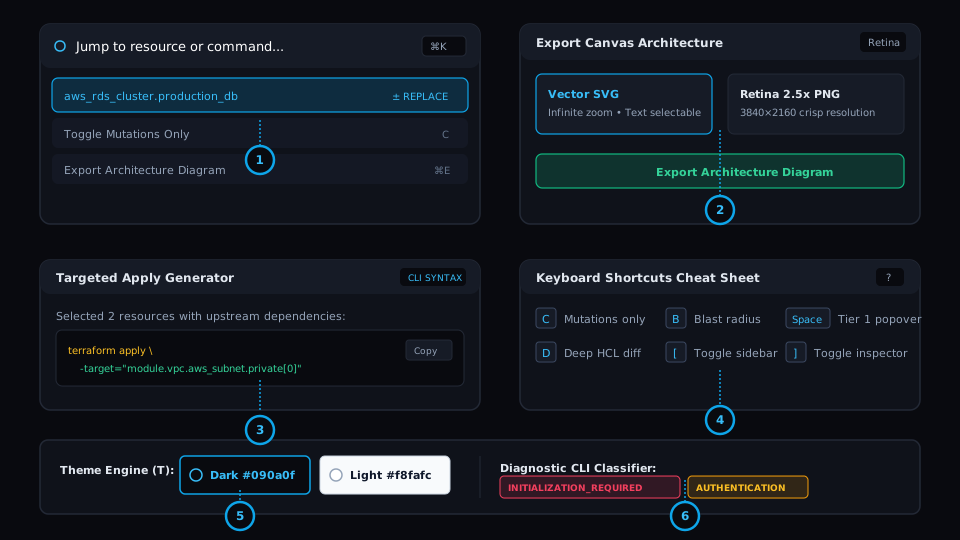
Global Command Palette (⌘K)
Keyboard-first switcher to jump to any node, run actions, switch themes, and execute commands.
High-DPI Diagram Export
Export the full canvas as a Retina 2.5x raster PNG or infinite-zoom vector SVG for PR reviews.
Targeted Apply Generator
One-click generation of exact `terraform apply -target="..."` commands for isolated deployments.
Keyboard Shortcuts Cheat Sheet (?)
Comprehensive quick-reference modal documenting all workstation navigation hotkeys.
Precision Theme Engine (T)
Seamless toggle between Dark Workbench (#090a0f) and High-Contrast Light Mode (#f8fafc).
Diagnostic CLI Error Classifier
Intelligent error classifier pinpointing permission, authentication, and configuration failures.
The Problem
Context Switching in High-Velocity Workflows
Power users need hotkey ergonomics, easy artifact sharing for PR descriptions and post-mortems, and instant targeted commands without memorizing complex CLI flags.
Under the Hood: Engine & Algorithm
Workstation-Grade Tooling Suite
Built with Cytoscape SVG exporters, fuzzy matching algorithms in the Command Palette, and automated dependency aggregation for targeted applies.
Workstation Flow: How to Use
Access all workbench features and search all resources with instant keyboard input.
Export high-resolution SVG or Retina PNG diagrams to paste directly into GitHub Pull Requests.
Select nodes or modules and copy the exact targeting CLI syntax with all required dependencies.
Real-World SRE & Platform Scenario
Pull Request Architecture Reviews
Before applying a major migration, an engineer exports a high-res SVG of the blast radius and pastes the targeted apply command into the PR, giving reviewers complete visual confidence.