Dedicated Resource Panel (Inspector)
Docked right slide-over inspector providing deep attribute diffs, lineage navigation, and raw schema views.
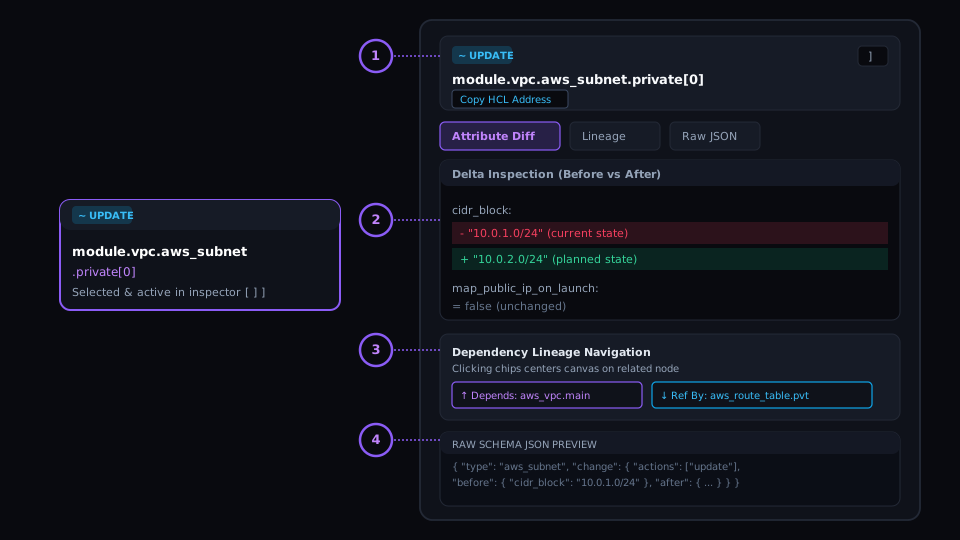
Resource Address & Copy Header
Full Terraform HCL address with one-click copy icon for instant CLI targeting.
Attribute Diff View
Real-time before/after property inspection with colorized syntax highlighting and change markers.
Lineage Navigation Chips
Interactive chips for upstream 'Depends On' and downstream 'Referenced By' that pan the DAG directly to related nodes.
Raw JSON Schema View
Full raw schema inspector displaying exact plan JSON structures with syntax highlighting.
The Problem
Context Switching and Lost Graph Focus
Reviewers constantly jump between graph visualizations, IDE windows, and terminal tabs to cross-reference resource configurations, losing their location and mental model in the graph.
Under the Hood: Engine & Algorithm
Non-Intrusive Docked Inspection
The Resource Panel docks cleanly to the right side of the canvas without occluding nodes. It tracks canvas selection in real time and offers bidirectional lineage navigation chips that automatically center the DAG on upstream or downstream dependencies.
Workstation Flow: How to Use
Press ']' at any time to expand or collapse the right inspector drawer.
Click any upstream dependency chip to immediately center the canvas on that node.
Click the address chip to copy the exact resource string for use in targeted apply commands.
Real-World SRE & Platform Scenario
Complex Multi-Tier Dependency Audit
While auditing a Kubernetes cluster rollout, clicking through lineage chips allows an SRE to traverse from an Ingress Controller up through Load Balancer, Subnets, and IAM roles in seconds.