2-Tier Progressive IaC Resource Diff
Instant contextual popovers paired with full-bleed side-by-side HCL and attribute matrix diffing.
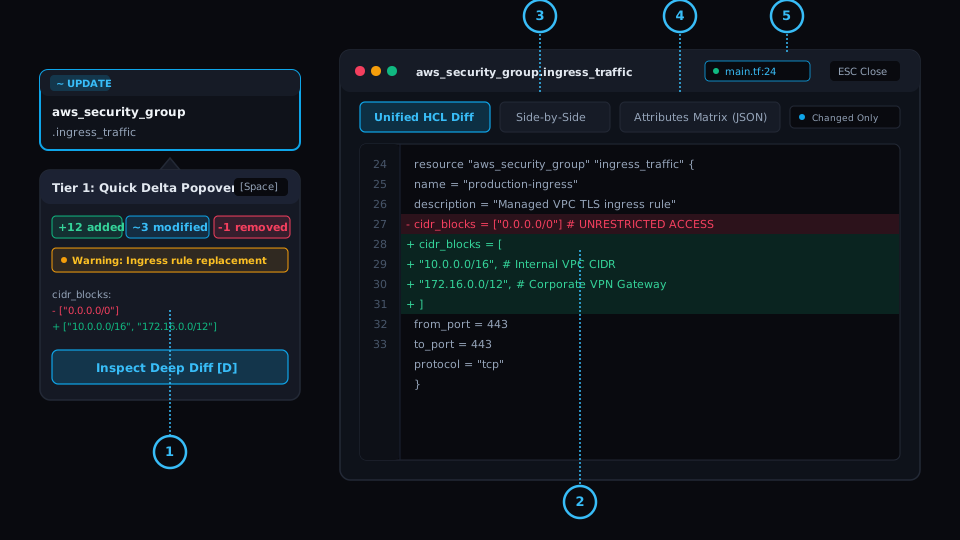
Tier 1 Quick Popover
Node-anchored modal displaying change summary badges (+N added, ~N modified, -N removed) and forces replacement warnings.
Tier 2 Unified HCL Diff
Terminal-accurate syntax highlighted HCL diff with sticky line gutters and colored block additions/removals.
Side-by-Side (Split) View
Synchronized dual-pane diff contrasting Current State (before) directly against Planned State (after).
Attributes JSON Matrix
Searchable tabular property inspector with a 'Changed Only' filter toggle for rapid parameter auditing.
AST Source Filepath Recovery
Pinpoints exact .tf source files and line numbers via AST inspection, with clear provenance badges distinguishing local workspace resolution from standalone plan fallback ('unknown file').
The Problem
The Terminal Diff Compromise
Engineers are forced to choose between truncated summary tables that hide crucial details, or scrolling through 8,000 lines of JSON plan diffs where critical replacement flags are lost in dense text blocks.
Under the Hood: Engine & Algorithm
Progressive Disclosure & AST Recovery Engine
plan-parse implements a two-tier inspection architecture paired with AST code recovery. Terraform plan JSON omits source filenames; when run in a workspace, plan-parse correlates .terraform/modules/modules.json and HCL ASTs to recover exact file paths (e.g. main.tf:15). In standalone plan uploads, unmapped items cleanly fallback to an 'unknown file' compound container with transparent provenance tooltips.
Workstation Flow: How to Use
Hover or select any node and press Space to open the quick delta summary popover.
Press D or click 'Deep Diff' to launch the full-screen modal with split HCL comparisons.
Cycle seamlessly between Unified Diff, Split View, and the Attributes Matrix.
Real-World SRE & Platform Scenario
IAM Policy Mutation Audit
A security policy change alters 4 out of 160 statements. Instead of reading through 500 lines of unformatted JSON, the Tier 2 split view flags the 4 modified ARN statements with color-coded additions and deletions.